
NoteFixQA

Better Documentation, Better Reimbursement.

Home Health Therapy Documentation Review

Catch documentation errors and get suggestions on how to fix them.

Review home health therapy notes before submission.
NoteFix QA flags documentation gaps and explains what needs attention.

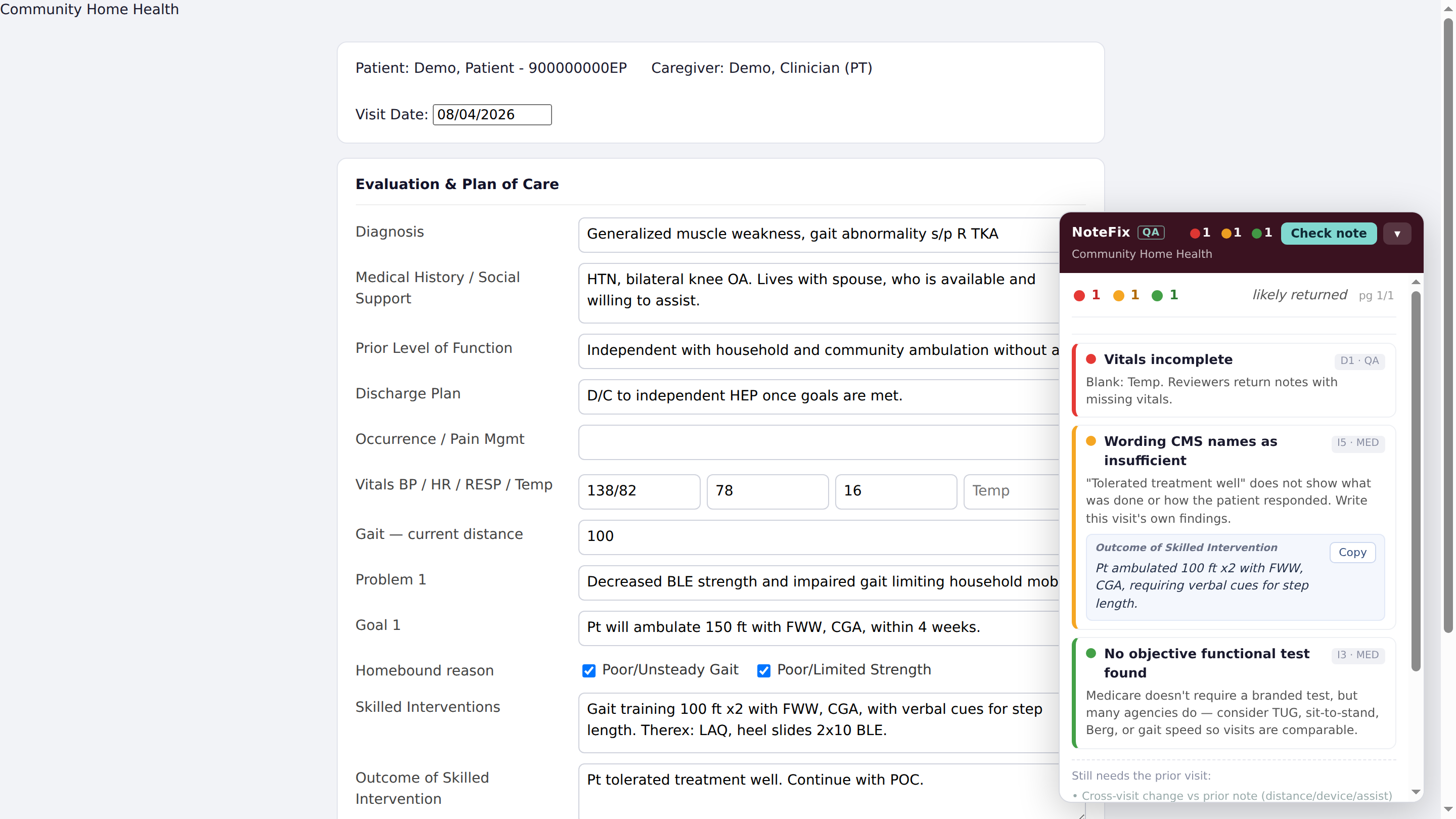
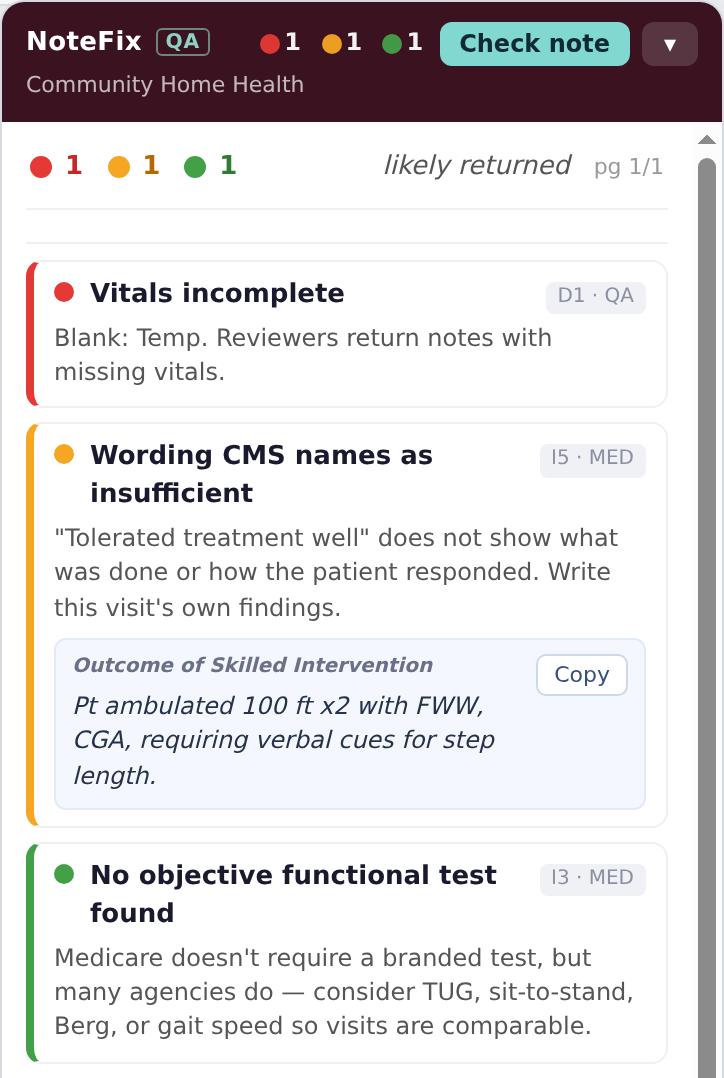
The NoteFix QA panel after a check, showing one flag of each colour: red, vitals incomplete because temperature is blank; yellow, the phrase tolerated treatment well, with a replacement sentence built from the visit's recorded values; green, no objective functional test found.
Real panel, shown on a made-up patient note.

What a NoteFix QA finding looks like.

NoteFix QA opens beside the note in Devero. Click Check note and each finding shows up with what to fix and why.

  • Red for something important that was missed or has to change
  • Yellow for something worth fixing, though it would not get the note returned
  • Green for suggestions you may want to add

Below, one gait example from note to fix.

  1. The note says

    Gait today
    100 ft x2, front wheeled walker, contact guard
    Cueing
    Verbal cues for step length
    Prior visit
    75 ft, front wheeled walker, min assist
    Gait goal
    150 ft with front wheeled walker, stand by assist, in 4 weeks

    Outcome of skilled intervention "Patient tolerated treatment well."

  2. NoteFix QA flags

    Wording CMS names as insufficient

    "Tolerated treatment well" does not show what was done or how the patient responded. Medicare's manual gives this exact phrase as an example of documentation that does not show skilled care. The note already records the progress that does.

  3. NoteFix QA suggests

    Pt ambulated 100 ft x2 with FWW and CGA, requiring verbal cues for step length, progressing from 75 ft with min A at the prior visit. Continue gait training toward the goal of 150 ft with FWW and SBA.

    Built only from what the note records. The therapist copies it into Outcome of skilled intervention, adjusts it, and adds how the patient responded.

Less corrections, fewer returned notes, faster documentation.

Helps therapists address documentation gaps before submission, so QA reviewers work more efficiently.

Two clinicians guarding an older man on either side as he walks in his bedroom at home.

For therapists

Create fresh, polished notes that can stand up to agency and insurance scrutiny.

  • Catch missed required fields
  • Flag discrepancies
  • Compare against previous notes
  • Receive suggestions for missed fields or areas that need correction
  • Be reminded of agency-specific information

A clinician at her desk reviewing a note on her laptop.

For QA teams

Catch errors and omissions faster, allowing extra time to process documentation.

  • Flag missing fields and checkboxes
  • Compare previous notes as necessary
  • Catch goals and wording that are not Medicare compliant
  • Flag agency-specific rules
A smiling clinician in a white coat with a stethoscope.

For agency leaders

Maintain up-to-date quality standards to ensure proper documentation.

  • Evaluate review time
  • Update new documentation rules with ease
  • Make more efficient use of QA time and resources
  • Tailor the checks to your agency's own documentation standards

Two editions, one workflow.

Both run in the same Chrome extension for Devero. Each person uses the edition that fits their part of the review.

Therapist edition

Findings, plus suggested wording built from what the note already records.

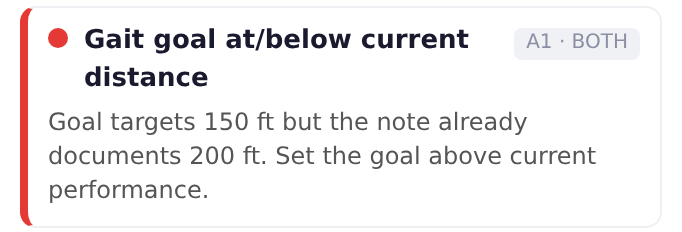
A therapist edition finding: the gait goal targets 150 feet, but the note already documents 200 feet, so the goal should be set above current performance.
  1. Write the note

  2. Run the tool

  3. Fix suggested corrections

  4. Submit the note

QA edition

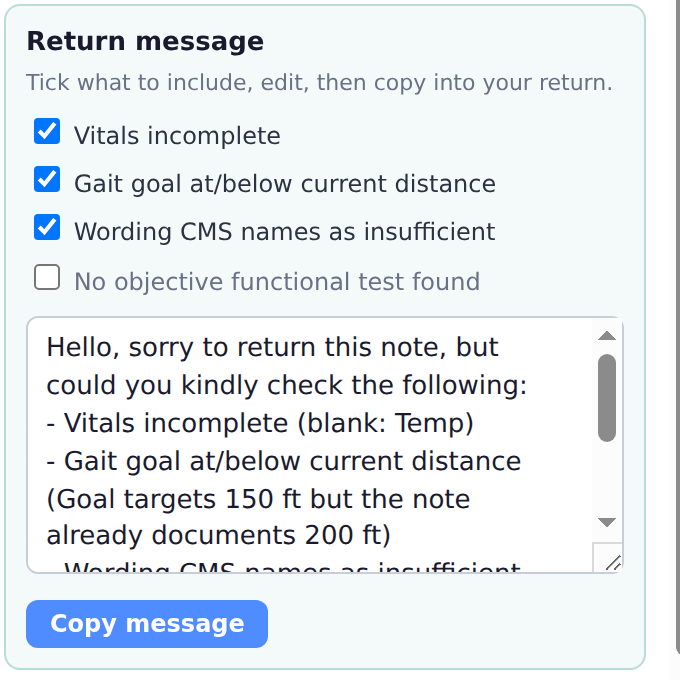
Findings in seconds, plus a return message ready to send to the therapist.

The QA edition: findings without suggested wording, and a return message built from them, ready to copy.
  1. Open the note

  2. Run the tool

  3. Copy the return message into your return

The clinician decides what belongs in the record. NoteFix QA supports documentation review and does not replace clinical judgment.

Try it with your team. Measure the difference.

Start with a demonstration, then define a focused pilot around your agency's documentation and review process. Access is currently limited to approved testers.

Agree on a baseline and success criteria before the pilot, then review the results together.

Discuss a pilot

What we would measure

Review time

Time spent reviewing a note.

Returned notes

Notes sent back for documentation corrections.

Follow-up effort

Time spent on corrections after a return.

Flag quality

What was useful, what was missed, what was raised in error.

Measure Results! Improved note review efficiency and accuracy

Clear answers about patient data.

A visit note is patient information, so here is what moves, what is kept, and what has to be agreed before any pilot on real notes.

Read the full privacy policy

What NoteFix QA does

  • Reads the note open on your screen, only when you click Check note
  • Flags missing fields, discrepancies, and wording that gets notes returned
  • Compares against a previous visit you have opened, to show progress
  • Suggests wording built from what the note already records
  • Hands you a Copy button, so every word that goes in is your choice

What NoteFix QA doesn't do

  • Store your notes. When a check runs, we don't save the note's text
  • Log in to Devero or connect to Devero's systems
  • Change, fill in, or submit any field. Every edit is made by the therapist
  • Make clinical decisions. The clinician decides what belongs in the record
  • Sell or share data, or show advertising

Built for HIPAA compliance

Runs on Amazon Web Services' HIPAA-eligible cloud, with zero data retention. Notes aren't saved once a check finishes. We sign a business associate agreement with your agency before any pilot on real notes.

Questions agencies ask

What leaves the browser?

When a check is run: the contents of the fields on that note, including the narrative text, plus a random identifier for that installation and the version of the extension. No account, no name, no login.

The extension is configured to run only on the visit documentation pages it supports, and is not granted access to other sites in the browser.

Where is it processed?

In our own Amazon Web Services account, in a US region, on HIPAA-eligible AWS services including Amazon Bedrock.

Zero data retention is enabled on our Bedrock account. AWS describes that setting as meaning no request or response data is written to durable storage by AWS or shared outside AWS. Amazon states that content sent to Bedrock is not used for training, and we have not turned on its optional request logging. The full list of providers involved is in the privacy policy.

What do you store, and for how long?

From an ordinary check: the identifiers of the rules that fired, how long it took, the installation identifier and the version. The note's text is not written to our database and not written to our logs.

We also keep a one-way fingerprint of the note, so checking the same note three times counts once. The note cannot be reconstructed from it.

Everything we retain expires after six months.

What happens when someone sends feedback?

Feedback is switched on only for approved testers who help us improve the checks. Clinicians at your agency do not see it, so their checks keep nothing. A tester can tell us a flag was wrong, and that message is stored so the check can be corrected. If they tick the box to attach the field the flag came from, that field's text is stored with it. The panel says so first, and it is never automatic.

Patient names and patient numbers are stripped automatically before storage, and it is deleted after six months.

Who has access?

Stored feedback is reachable only by the person who operates the service, through a separate credential, and only to correct a check. The therapist using the extension sees their own notes in their own browser. Nothing is sold, rented, or shared for anyone else's purposes, and there is no advertising.

What has to be in place before a pilot on real notes?

A business associate agreement between your agency and NoteFix QA, and a review of everything above with whoever owns compliance on your side. Amazon Bedrock is HIPAA-eligible under an AWS business associate agreement, which is a prerequisite on our side rather than a certification of this product.

We hold no certification, audit, or accreditation, and will not claim one. A demonstration needs none of this, because it runs on a fictional note.

Let's look at your workflow.

Tell us a little about your team. We'll follow up to arrange a demonstration or discuss early access.

  1. A demonstrationWe walk through NoteFix QA on a made-up patient note.
  2. A focused pilotDefined around your agency's documentation and review process.
  3. Results, reviewed togetherAgainst the baseline and success criteria agreed before the pilot.

Or write to hello@notefixqa.com.

Please do not include patient names, records, or other patient information.